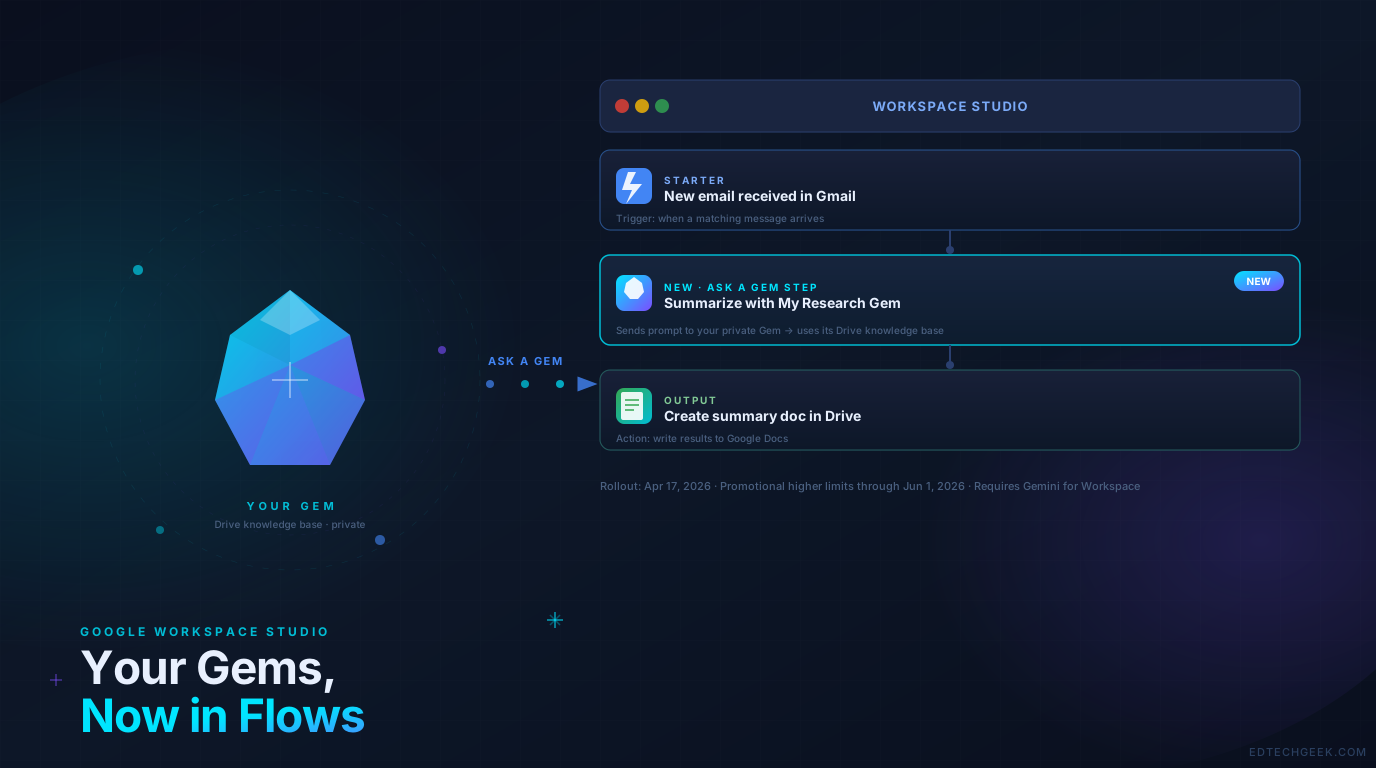
If you’ve spent time building custom Gems in Gemini — those private AI agents trained on your own documents and knowledge — you may have run into an obvious limitation: they only work when you actively go talk to them. You can’t pull them into a background process or let them run on their own.
That just changed. Google has added an “Ask a Gem” step to Workspace Studio flows, which means your custom Gems can now be part of fully automated workflows that run without you lifting a finger.
A Quick Refresher: What Are These Things?
Gems are customized AI agents you build inside Gemini. You give them a name, a set of instructions, and optionally a knowledge base — files from your Google Drive that the Gem uses as context when answering questions. A “Research Gem” trained on your institution’s accreditation docs, a “Grant Writing Gem” loaded with your past successful proposals, a “Course Design Gem” familiar with your curriculum frameworks — those are all Gems.
Workspace Studio (formerly Google Workspace Flows) is Google’s no-code workflow automation tool. You build a flow by setting a trigger — called a “Starter” — and then chaining together a series of steps that run automatically. No Apps Script, no AppSheet, no cloud project required. Think of it as Zapier or Make, but built natively into Workspace and powered by Gemini.
Until now, those two tools lived in separate worlds. The new Ask a Gem step bridges them.
What the “Ask a Gem” Step Actually Does
The step lets you embed a Gem into any point in a flow. You pick which Gem to use, write a prompt, and the flow sends that prompt to the Gem — which responds using its instructions and its Drive-based knowledge base.
A few practical examples of what this unlocks:
- Auto-summarize incoming emails — a flow triggered by a new Gmail message uses your Research Gem to generate a structured summary and drops it into a Doc
- Weekly digest generation — a scheduled flow pulls recent updates and asks your Communications Gem to draft a stakeholder update in your institution’s voice
- Document intake processing — when a new file lands in a shared Drive folder, a flow passes it to your Policy Gem to flag any compliance concerns
- Meeting prep automation — a flow fires before a calendar event and asks your Context Gem to pull relevant background materials
The key constraint worth noting: the Gem must have Drive files in its knowledge base. Gems built with Google Photos or other non-Drive sources won’t appear in Studio. So if you’ve been building Gems backed by Docs, Sheets, or PDFs in Drive, you’re ready to go. If not, it’s a good nudge to organize your knowledge assets there.
Why This Matters for Edtech
The big unlock here is institutional memory at scale. Most schools and universities have enormous amounts of context locked in Drive folders — policy documents, curriculum maps, past grant applications, meeting notes, research archives. Gems let you train an AI on that context. Studio lets that AI run automatically in the background.
Put them together and you start to get workflows that would have required a developer a year ago. A department admin can build a flow that processes incoming requests through a Gem that actually knows the institution’s policies. A curriculum coordinator can automate weekly content digests that reflect the department’s actual frameworks.
For IT and Workspace admins, the setup is straightforward: the Ask a Gem step is available by default if you’ve already enabled Gemini for Google Workspace steps in your domain. No additional configuration required.
Availability and the June 1 Deadline
The rollout started on April 17, 2026 as a gradual release (up to 15 days for full visibility) across both Rapid and Scheduled Release domains.
One timing note worth flagging: through June 1, 2026, Workspace customers have promotional access to higher usage limits for Studio. After that date, per-user limits kick in. If you’ve been curious about Studio but haven’t experimented yet, the next few weeks are the time to do it — you have more headroom right now than you will later.
The Bottom Line
The Ask a Gem step is a small update with a larger implication: Google is methodically connecting the pieces of its Workspace AI ecosystem. Gems gain real utility when they can act autonomously inside workflows rather than waiting for you to start a chat. For institutions that have already invested time in building well-structured Gems with solid Drive knowledge bases, this is a direct payoff on that investment.
If you’re new to Gems or Studio, this is a good moment to explore both together. Start with a single, narrow use case — something you do repetitively and would genuinely benefit from automating — and build from there.
Source: Google Workspace Updates Blog — Use your Gems in your Google Workspace Studio flows (April 2026)